Templates / ES Heatmap optimized
What's Included

Inside this template.

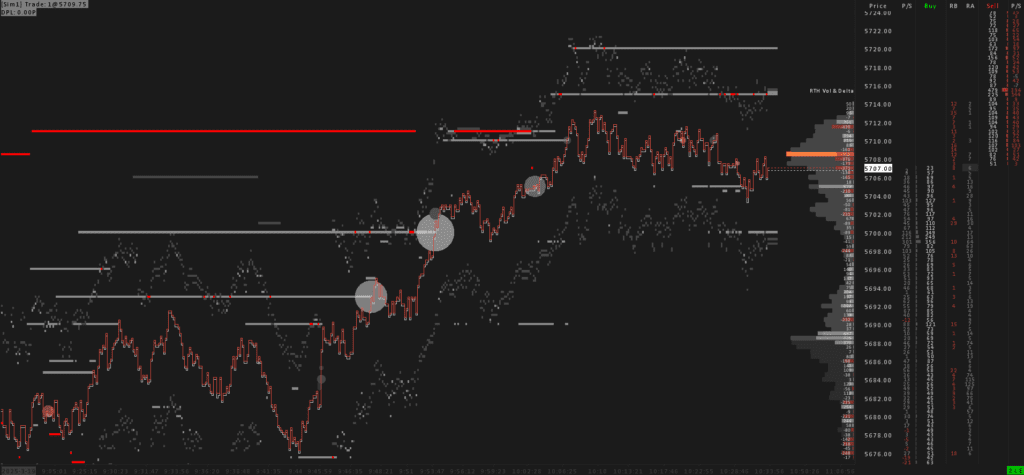
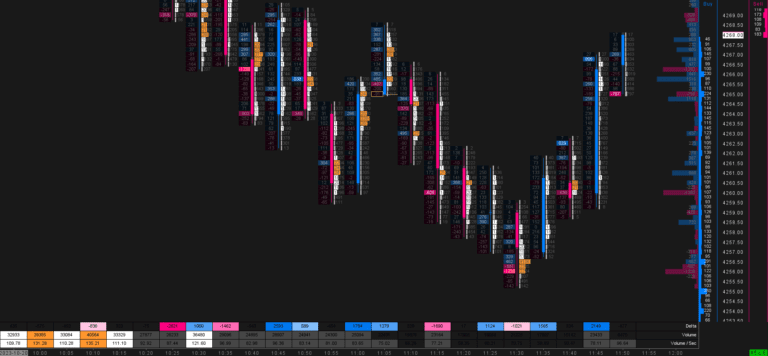
This Heatmap is specifically designed for ES futures, focusing on countering the smoke-screening algorithms that have been active in the RTH session for over a year. Traditional Heatmaps make it nearly impossible to maintain a clear overview and confidently identify valid liquidity levels. That’s why we created this template—to provide a clearer, more reliable view of the market.


  • Optimized Liquidity Heatmap – Countering the smoke-screening algorithm
  • Large Volume Trade Indicator – Visualization and highlighting of large trades
  • Iceberg Detector – Identifying involvement of big players and key areas.
  • Ready-to-trade DOM –  Bid Market Depth Pulling/Stacking, Bid Size/Buy Column, Recent Bid Volume, Recent Ask Volume, Ask Size/Sell Column, Ask Market Depth Pulling/Stacking


Note: An enhanced version of this template is also available in our Crimson Suite and the Orderflow Suite Crimson.
Good to know

FAQ.

What Sierra Chart package do I need?
We recommend Sierra Chart Package 11 for this template.
How do I install the template?
1) Download the included files. 2) Place them in your Sierra Chart Data folder. 3) Open the chartbook. Detailed Installation Guide →
Can I use the template for all products?
Yes, but in their default state these templates are optimized for specific markets (such as ES, NQ, Crude Oil, Gold or Bitcoin). For any other instrument, adjust the session times, scaling and volume settings to match. See the official Sierra Chart documentation for guidance.
Scroll to Top