Templates / Volume Profile / ES Renko Chart with day-generated Levels
What's Included

Inside this template.

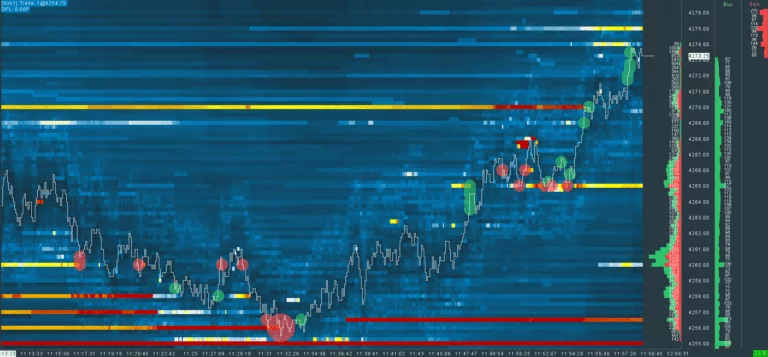
ES Renko Chart with day-generated Levels covers the full ES session, overnight and regular hours, on a Renko chart that draws every important level of the day for you. It is chart 4 of the Crimson Day Trading Suite: the screen where you set your daily bias and watch how price behaves at the levels that matter.

What is on the chart

  • Renko bars: movement-based, not time-based, so the chart only changes when price moves
  • Day-generated levels, drawn automatically: Open, previous close, previous settlement, previous day high and low, previous week and previous month high and low, Point of Control (POC), Initial Balance high and low, full-session VWAP, regular-hours VWAP, full-session mid, regular-hours mid, overnight high and overnight low
  • Separate overnight and RTH volume profiles

Why every level is drawn for you

Marking 15 or more levels by hand every morning takes time and invites mistakes. This chart recalculates them for each session, so the moment the regular session opens you already know where the overnight high and low are, where yesterday settled and where the Initial Balance is forming. Your job is only to watch how price reacts: does it accept above the overnight high, or reject it and rotate back to VWAP?

Overnight first, then the day

The overnight session often sets the tone for the regular session. If ES builds value above yesterday’s range overnight and the open holds above it, the bias is up. If the open falls back into yesterday’s range, a rotation to the other side of the range becomes more likely. The two separate profiles let you read both sessions on their own terms.
Good to know

Good to know

FAQ.

What Sierra Chart package do I need?
We recommend Sierra Chart Package 10 for this template.
How do I install the template?
1) Download the included files. 2) Place them in your Sierra Chart Data folder. 3) Open the chartbook. Detailed Installation Guide →
Can I use the template for all products?
Yes. In its default state this template is optimized for ES (S&P 500). For any other instrument, adjust the session times, scaling and volume settings to match. See the official Sierra Chart documentation for guidance.
Scroll to Top